
Connecting a Hard Disk Drive
Connecting a Hard Disk Drive. Connecting a Hard Disk drive to the motherboard
IDE Hard Disk Drives
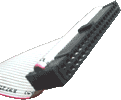
If your Hard Drive is what is known as 'ATA33' type, then it is connected in exactly the same way as the CD-ROM.
If, however, you have an 'ATA66/100' type, then the connection procedure is still the same, but the ribbon cable must be a special '80way' kind. '80way ATA66/100' cables look similar to their 'ATA33' counterparts, but have 80 wires instead of 40. They often have colour-coded connectors as follows;
- Blue connector - to Motherboard
- Grey connector - to 'Slave' Device
- Black connector - to 'Master' Device
Note that connector colours may vary depending on manufacturer.
In both cases, it is important to note that the Hard Drive IDE cable must be connected to the Primary IDE connector on the Motherboard if it is to be the main/only HDD in the PC.
Need Help?
Read our IDE Configuration crash course
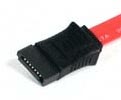
SATA Hard Disk Drives
Alternatively, if your Hard Drive is a SATA type, then the connections will be quite different. SATA uses a much thinner ribbon cable. New SATA compatible motherboards will usually have some SATA ribbon cables supplied in the box, ready for use.
Use one of these to connect each SATA Hard Drive to the motherboard connector as instructed by the motherboard manual.